;stroke-width:0px;}%3c/style%3e%3clinearGradient%20id='Degradado_sin_nombre_3'%20x1='993.28627'%20y1='-179.86134'%20x2='-9.62936'%20y2='400.65514'%20gradientUnits='userSpaceOnUse'%3e%3cstop%20offset='0'%20stop-color='%23011781'/%3e%3cstop%20offset='.59897'%20stop-color='%23002fdd'/%3e%3cstop%20offset='1'%20stop-color='%230082e6'/%3e%3c/linearGradient%3e%3c/defs%3e%3cg%3e%3cpath%20class='cls-1'%20d='M896.07535,270.53973l-.00006.00004c-35.81778,20.67941-81.61781,8.40733-102.29721-27.41046L659.20706,10.04547l.00007-.00004c35.81778-20.67941,81.61781-8.40733,102.29721,27.41046l134.57102,233.08384ZM826.65058,130.29272l69.4248-120.24725v-.00006c-35.81787-20.67938-81.61792-8.40729-102.29736,27.41046l-10.36328,17.94995,43.23584,74.8869ZM728.63178,150.29248l-69.42456,120.24725v.00006c35.81763,20.67938,81.61768,8.40729,102.29712-27.41046l10.36353-17.94995-43.23608-74.8869ZM298.61936,10.56566l-37.5874,88.46433c-2.03,5.31507-3.73742,11.14089-5.12598,17.46447-1.39412,6.33007-2.59914,12.2801-3.60765,17.84544h-4.55498c-1.26991-5.56535-2.46937-11.44956-3.60765-17.65542-1.13828-6.19937-2.84756-11.95937-5.12598-17.27537L201.04228,10.56566h-73.65647l88.4634,181.48457h67.96321L372.27583,10.56566h-73.65647ZM214.33089,150.66516v121.87587h71.37991v-121.87587h-71.37991ZM559.45273,10.56566l.38005,125.67261c0,7.59349.25027,15.18698.76009,22.78047.50426,7.59349,1.13828,15.31675,1.89837,23.15958h-3.4167c-3.03851-8.09774-6.20679-15.81544-9.49186-23.15958-3.29249-7.33858-6.71104-14.0487-10.25195-20.12293l-61.508-107.44805c-4.05073-6.83433-7.84747-12.0187-11.39023-15.56702-3.54647-3.54091-9.11182-5.31507-16.7053-5.31507h-31.51224c-16.7053,0-25.05888,8.35265-25.05888,25.05888v236.91648h66.44303v-130.22852c0-7.08275-.32072-14.48714-.94919-22.2104-.63403-7.71863-1.459-15.2463-2.46751-22.59137h3.4167c2.02258,7.34507,4.55683,14.68272,7.59349,22.0213,3.03665,7.34414,6.07516,14.17847,9.11182,20.50298l64.16461,111.62392c3.79674,6.83433,7.5286,12.02519,11.20114,15.56702,3.66697,3.5474,9.30277,5.31507,16.89625,5.31507h31.89228c16.44947,0,24.67884-8.35265,24.67884-25.05888V10.56566h-65.68479ZM119.91841,279.6364c-25.47719-10.88605-45.03144-34.07385-45.03144-74.8869V75.8357C74.88698,34.47681,41.35897.9488.00007.9488h-.00007v203.8007c0,41.35889,33.52801,74.8869,74.8869,74.8869h45.03151ZM182.27302,276.53045v.00007h0s-23.85712,0-23.85712,0c-37.80944,0-69.81178-28.87333-72.61406-66.57879-.05642-.75919-.10384-1.52513-.14206-2.29786h27.73668c38.03948,0,68.87656,30.83709,68.87656,68.87656Z'/%3e%3c/g%3e%3c/svg%3e)
SETTINGS & SECURITY Who sees what, and who answers for it.
Giving everyone access to everything is the fastest way to make nobody trust the data.
Settings & Security, included in the Lynx core, decides who gets in and what they see: you create each account, choose which plants and lines they see and schedule the reports they receive. All from a single panel, on a platform aligned with ENS, IEC 62443 and ISO/IEC 27001, with an external pentest passed.
WHO GETS IN, AND TO WHAT Each person sees their plant and their line. Nothing else.
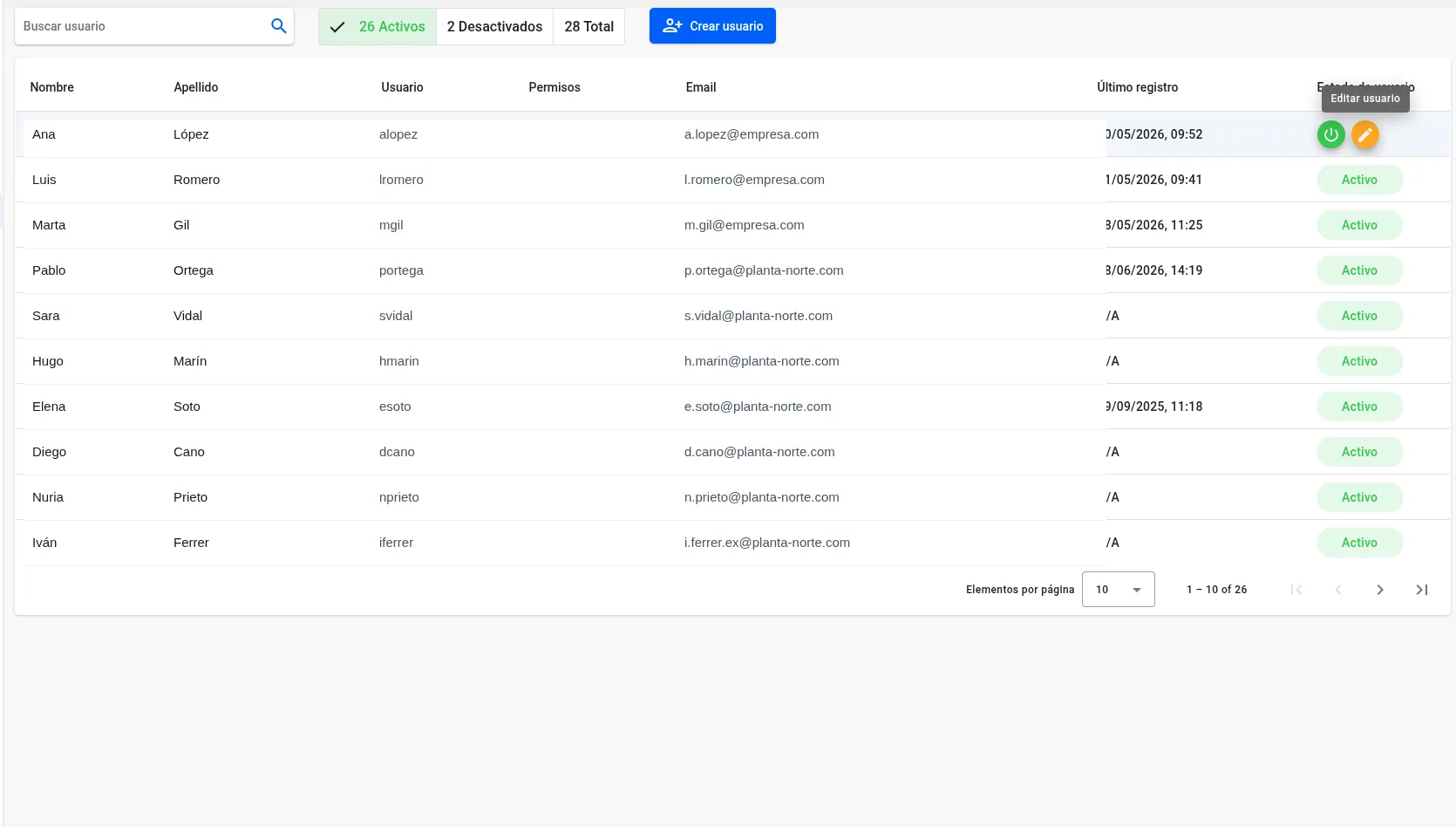
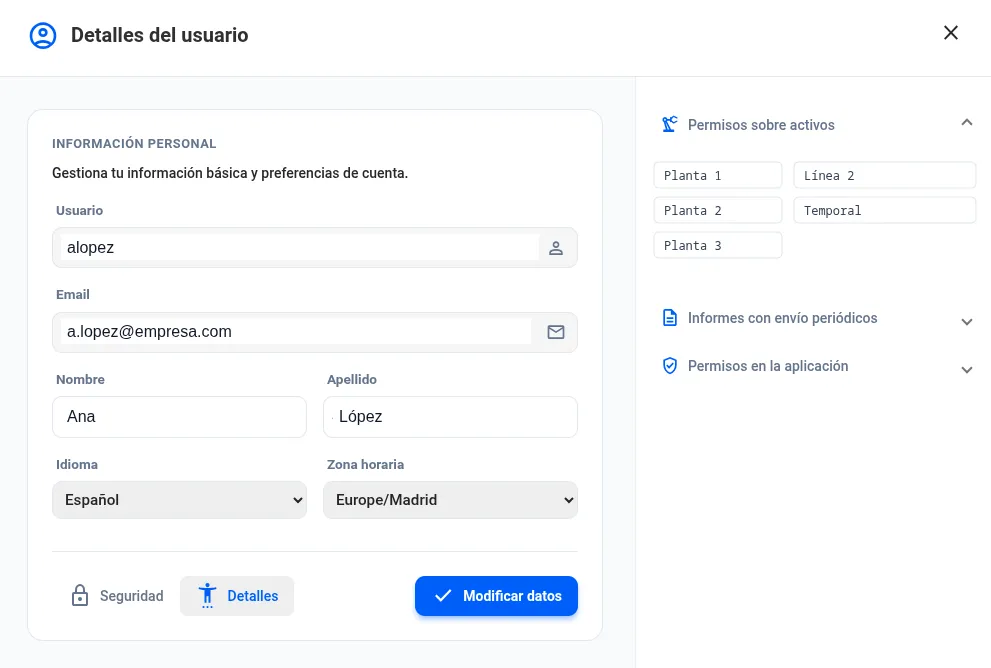
You create the user, decide which plants and lines they see, and schedule the reports they receive. Each person manages their profile, their language and their time zone. The panel keeps the count of active, disabled and total.
- Accounts and states
Creation, search and enabling or disabling of users, with control of active, disabled and total.
- Asset permissions
Grant access by plant and line, plus in-app permissions, user by user.
- Scheduled reports
Scheduling of recurring reports, with defined recipients and frequency.
External security audit Security pentest passed
Lynx has undergone a penetration test (pentesting) carried out by an independent security firm, validating the platform's robustness against real-world threats.
WHEN THE AUDIT COMES Auditable data, and it need not leave the plant
Lynx integrates your plant's protocols and delivers data you can audit against the standards that already apply to you. And that data need not leave the plant: besides managed hosting, Lynx runs on your own infrastructure.
Energy management & M&V
- ISO 50001:2018Energy Management System (EnMS).
- ISO 50006:2014EnPI definition and energy baseline.
- ISO 50015 · IPMVPMeasurement & Verification of savings.
Emissions & reporting
- GHG ProtocolThe reference standard to measure, manage and report greenhouse-gas emissions.
- ISO 14001:2015Requirements for an environmental management system.
- CSRD · ESRS E1-readyProvides auditable data to corporate sustainability platforms.
Industrial interoperability
- Modbus TCP/RTUFieldbus protocol for PLCs and equipment.
- OPC UA · IEC 62541Open industrial interoperability standard.
- MQTT / Sparkplug BLightweight messaging for IIoT telemetry.
- EtherNet/IP · CIPIndustrial protocol over Ethernet, from the CIP standard.
- EtherCATDeterministic Ethernet for control and drives.
- CANopenCAN bus for machinery, industrial vehicles and drives.
Power, utilities and buildings
- IEC 61850 · MMSCommunication standard for substations and electrical equipment.
- IEC 60870-5-101/104Telecontrol for power grids and utilities.
- DNP3Telecontrol and data acquisition for utilities.
- SunSpecStandardized register map for photovoltaic inverters.
- BACnet/IP · MS/TPBuilding automation and HVAC standard.
- KNX · KNXnet/IPStandard for building installations and control.
- M-Bus · Wireless M-BusEN 13757, meter reading for water, gas and heat.
- DLMS/COSEM · IEC 62056Standardized reading of electricity meters.
Native PLC protocols
- S7 · ISO-TCPNative protocol of Siemens SIMATIC S7 PLCs. On S7-1200 and S7-1500 with optimized data blocks, the block optimization has to be turned off or the data read through the PLC's own OPC UA server.
- Logix · CIPTag-level access to Rockwell ControlLogix and CompactLogix PLCs, over CIP.
- FINSNative protocol of Omron PLCs.
OT / IT cybersecurity
- ENSSpain's National Security Framework.
- IEC 62443Security for industrial automation and control systems.
- ISO/IEC 27001Information security management.
Trademarks and product names cited belong to their respective owners and are used solely to identify the equipment Lynx interoperates with. They imply no agreement, certification or joint programme with any of them.

Put a name on every permission
While everyone sees everything, nobody answers for anything. Bring your plant org chart and we leave with the roles, the per-plant and per-line permissions and the reports mapped out, plus the detail of how the platform is secured end to end.
Or write to us directly at support.dt@dominion-global.com