;stroke-width:0px;}%3c/style%3e%3clinearGradient%20id='Degradado_sin_nombre_3'%20x1='993.28627'%20y1='-179.86134'%20x2='-9.62936'%20y2='400.65514'%20gradientUnits='userSpaceOnUse'%3e%3cstop%20offset='0'%20stop-color='%23011781'/%3e%3cstop%20offset='.59897'%20stop-color='%23002fdd'/%3e%3cstop%20offset='1'%20stop-color='%230082e6'/%3e%3c/linearGradient%3e%3c/defs%3e%3cg%3e%3cpath%20class='cls-1'%20d='M896.07535,270.53973l-.00006.00004c-35.81778,20.67941-81.61781,8.40733-102.29721-27.41046L659.20706,10.04547l.00007-.00004c35.81778-20.67941,81.61781-8.40733,102.29721,27.41046l134.57102,233.08384ZM826.65058,130.29272l69.4248-120.24725v-.00006c-35.81787-20.67938-81.61792-8.40729-102.29736,27.41046l-10.36328,17.94995,43.23584,74.8869ZM728.63178,150.29248l-69.42456,120.24725v.00006c35.81763,20.67938,81.61768,8.40729,102.29712-27.41046l10.36353-17.94995-43.23608-74.8869ZM298.61936,10.56566l-37.5874,88.46433c-2.03,5.31507-3.73742,11.14089-5.12598,17.46447-1.39412,6.33007-2.59914,12.2801-3.60765,17.84544h-4.55498c-1.26991-5.56535-2.46937-11.44956-3.60765-17.65542-1.13828-6.19937-2.84756-11.95937-5.12598-17.27537L201.04228,10.56566h-73.65647l88.4634,181.48457h67.96321L372.27583,10.56566h-73.65647ZM214.33089,150.66516v121.87587h71.37991v-121.87587h-71.37991ZM559.45273,10.56566l.38005,125.67261c0,7.59349.25027,15.18698.76009,22.78047.50426,7.59349,1.13828,15.31675,1.89837,23.15958h-3.4167c-3.03851-8.09774-6.20679-15.81544-9.49186-23.15958-3.29249-7.33858-6.71104-14.0487-10.25195-20.12293l-61.508-107.44805c-4.05073-6.83433-7.84747-12.0187-11.39023-15.56702-3.54647-3.54091-9.11182-5.31507-16.7053-5.31507h-31.51224c-16.7053,0-25.05888,8.35265-25.05888,25.05888v236.91648h66.44303v-130.22852c0-7.08275-.32072-14.48714-.94919-22.2104-.63403-7.71863-1.459-15.2463-2.46751-22.59137h3.4167c2.02258,7.34507,4.55683,14.68272,7.59349,22.0213,3.03665,7.34414,6.07516,14.17847,9.11182,20.50298l64.16461,111.62392c3.79674,6.83433,7.5286,12.02519,11.20114,15.56702,3.66697,3.5474,9.30277,5.31507,16.89625,5.31507h31.89228c16.44947,0,24.67884-8.35265,24.67884-25.05888V10.56566h-65.68479ZM119.91841,279.6364c-25.47719-10.88605-45.03144-34.07385-45.03144-74.8869V75.8357C74.88698,34.47681,41.35897.9488.00007.9488h-.00007v203.8007c0,41.35889,33.52801,74.8869,74.8869,74.8869h45.03151ZM182.27302,276.53045v.00007h0s-23.85712,0-23.85712,0c-37.80944,0-69.81178-28.87333-72.61406-66.57879-.05642-.75919-.10384-1.52513-.14206-2.29786h27.73668c38.03948,0,68.87656,30.83709,68.87656,68.87656Z'/%3e%3c/g%3e%3c/svg%3e)
REAL TIME Every signal, to the second.
The value you need to see right now has been waiting hours for somebody to export a history file.
Real time, included in the Lynx core, shows any registered variable with the value refreshing every second. Charts can be composed and dashboards tailored per equipment.
Refresh every 1 s
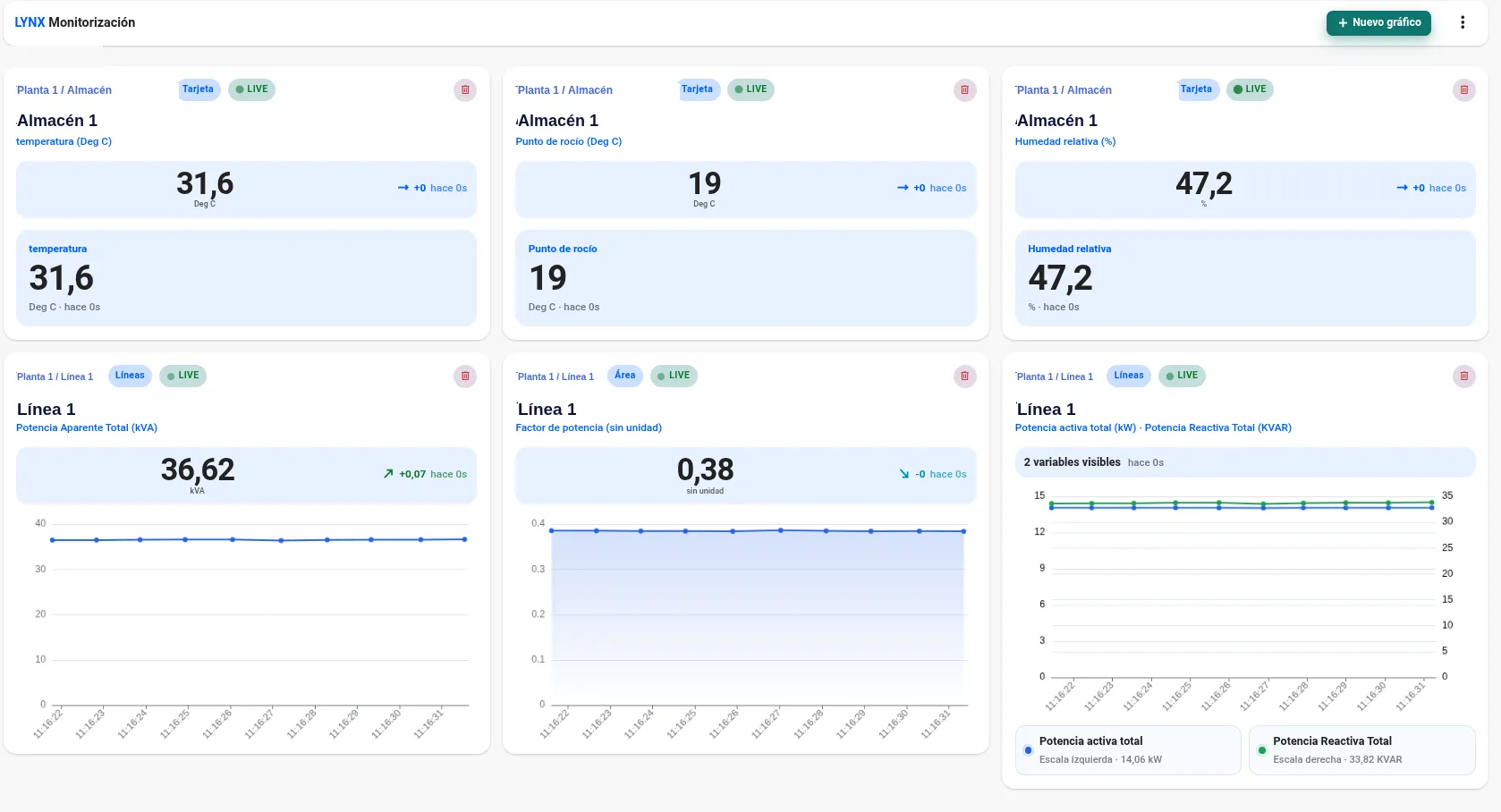
WHAT CHANGES ON YOUR SCREEN The plant value, one second after it happens
Real time brings the plant's pulse to the browser: any signal, the selected chart type and panels designed for each piece of equipment.
- One-second refreshEach variable updates every second, reflecting what happens on the floor as it happens.
- Any variableLive plotting of any signal registered in Lynx: electrical, process, environmental or from any asset.
- Per-equipment dashboardsTailored panels for each machine, with its critical values available without walking over to the equipment.
NO DEVELOPMENT Any chart in three steps
The «Compose chart» wizard guides through flow, data and confirmation. It supports one measure, several or a dual scale, with the display mode that fits best.
- One measure, several or dual scalePlot a single asset, combine several measures on one scale or split across two axes.
- Asset selection treeEach asset can aggregate signals from different data sources in the same chart.
- Guided 3-step wizardFlow → Data → Confirm. Any user can configure a chart with no learning curve.
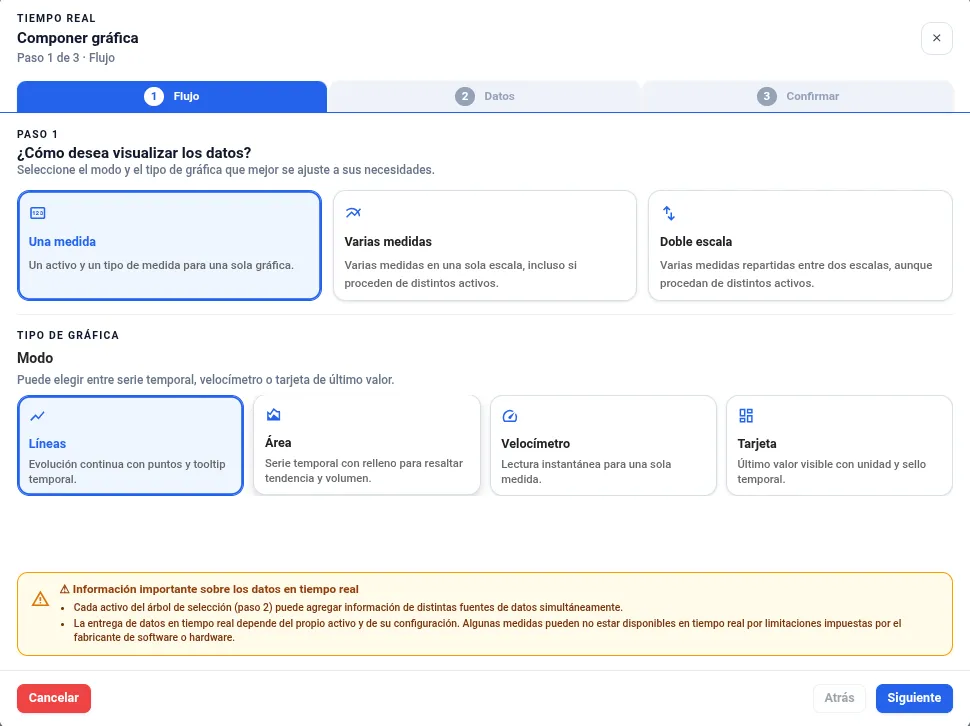
- LinesContinuous evolution
- AreaTrend and volume
- GaugeInstant reading
- CardLast value + stamp
EQUIPMENT DASHBOARD Check the machine without walking to the machine
One dashboard per machine, much like an electrical analyser. You check it is running right from your desk. Without walking over to it.
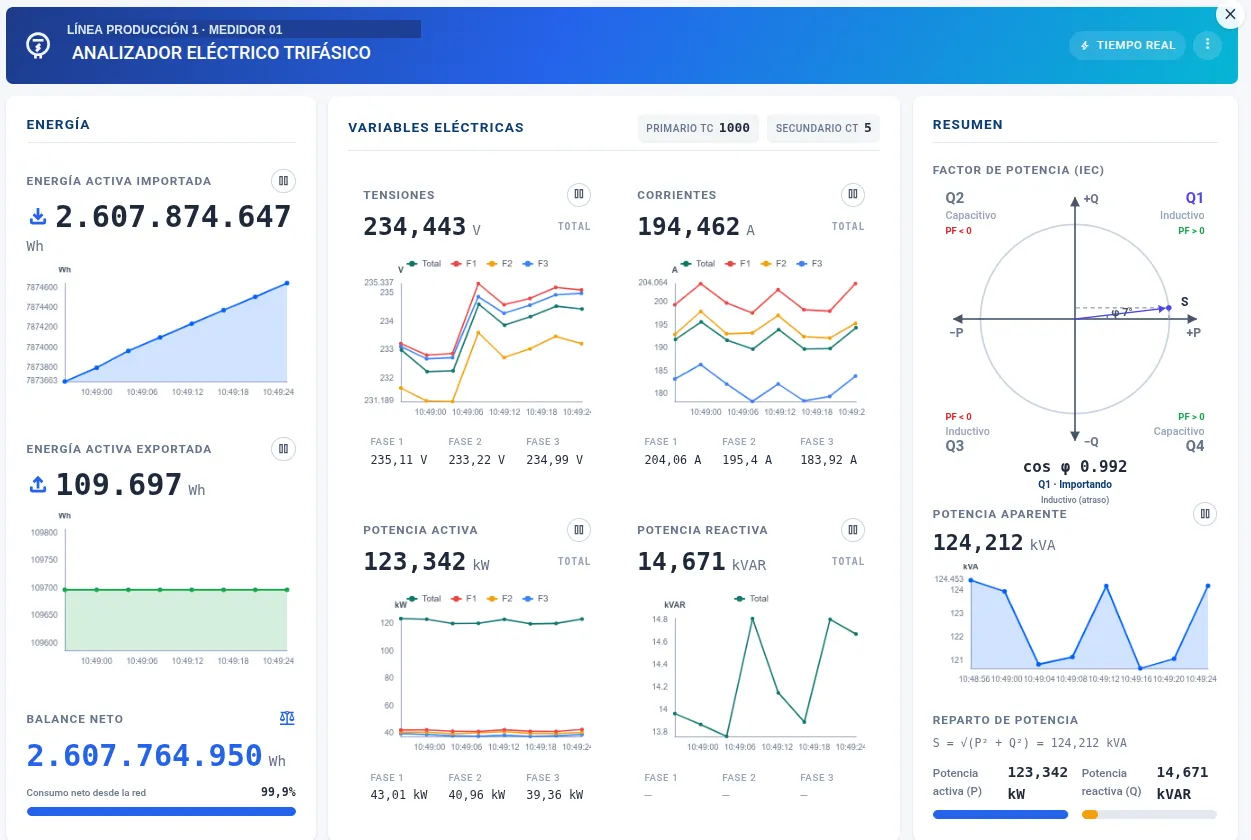
- Tailored per equipment
Energy, electrical variables and a clear summary, grouped the way the equipment needs.
- Remote status control
Verification of correct asset operation without going down to the floor.
- Same data, to the second
Every card and chart on the panel refreshes live with the equipment's telemetry.

Stop waiting for the history file
Pick one machine. We bring its signals onto the screen with a one-second refresh and design with you the panel you will look at every morning.
Or write to us directly at support.dt@dominion-global.com